





Student Forms
Document Submission Options
- Secure Document Upload
This is the fastest and most secure method for submitting student records documents. Acceptable file formats for document uploads include: pdf, xdp, pst, doc, docx, xls, xlsx, txt, rtf, jpg, jpeg, png, tiff, and tif. For questions or to let us know that you have submitted documents, please contact Registrar@ucdenver.edu. - Postal Mail
We accept paper forms through the mail. However, due to COVID-19, we may not be able to retrieve our mail on a regular basis. Please use the Secure Document Upload instead.
Mailing address: Office of the Registrar, CU Denver, Campus Box 116, P.O. Box 173364, Denver, CO 80217-3364 - In-person Form Submission
If you would like to drop off a form in-person you can do so at Lynx Central, on the first floor of the Student Commons Building
1201 Larimer St. Denver, CO 80204
Student Records Forms
Below are the Student Records forms that you may need to complete your request. When available, there will be an option for a fillable PDF that can be e-signed or submitted via the Secure Document Upload.
For questions or to let us know that you have submitted documents, please contact Registrar@ucdenver.edu.
For fillable PDF forms:
- Fill out the form on your computer and e-sign (see screenshot).
- Obtain any additional required approval signatures.
- Submit via the Secure Document Upload or use your @ucdenver.edu email account to submit the form to registrar@ucdenver.edu.
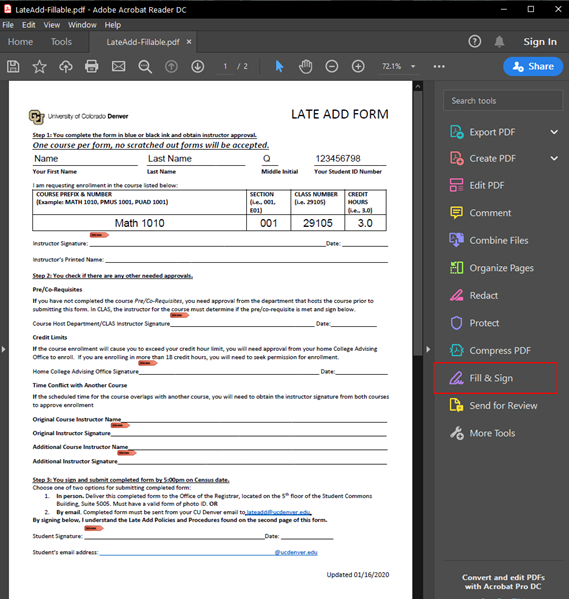
For all other PDF forms:
Please print and fill out the form you need, scan it and upload it through the Secure Document Upload. If you are unable to print and scan, please contact us at registrar@ucdenver.edu for assistance.
For questions or to let us know that you have submitted documents, please contact registrar@ucdenver.edu.
Chrome users: There is a known issue printing PDF files in Chrome. You may see fields duplicated in Print Preview and on the printed document. Go to chrome://plugins/ and disable the Chrome PDF Viewer. Or, use another browser, such as Firefox or Internet Explorer to fill out and print the PDF forms that are listed below.
Records and Enrollment Forms
Name Change and Record Update
Use this form for a name change, SNN/ITIN update, or if your student information on your record is incorrect.
Intra-University Transfer
This form is for students who want to transfer from one school or college to another or want to add or remove a second degree.
Enrollment Verification Form
Complete personal information, sign and date. Also indicate which semesters(s) you need verified. For dates not on form, please contact records at 303.315.2600.

Prevent Disclosure of Directory Information
The privacy form instructs the records office to put a privacy flag on your student records. Please note: This can be an inconvenience when seeking employment. Enrollment, degree status or major cannot be released without in-person verification and a photo ID.
Authorize Release of Confidential Information
This form authorizes CU Denver to release student information on transcript, grades, GPA, course schedule, financial tuition balance and payments, financial aid, COF status, birth date and student holds to the specified person or organization.
Registration and Schedule Adjustment Forms
Grade Forgiveness Opt-Out Form
If you would like to request to opt-out of grade forgiveness for a course please complete this form. You must be fully enrolled in the class (waitlisted classes are ineligible) before completing this form. Submit this form by the grade forgiveness deadline for the semester in which the class is being offered, per the Academic Calendar. Students may also cancel their grade forgiveness opt-out request by this same deadline.
Inter-Campus Enrollment Form
This form may be used by degree-seeking students to register through their home campus for courses taught at other University of Colorado campuses. Concurrent registration can only be conducted during the drop/add period at the host campus; registration will not be allowed before or after this drop/add period. For more information please read the concurrent registration policy and restrictions on the form.
Late Withdrawal Petition Form
This form should be used when a student is dropping a course between the Withdrawal Deadline (typically after the 10th week of classes) and the Wednesday before Finals Week.
Consortium Agreement Form
CU Denver students who want to take courses at other institution (e.g. Community College of Denver) must complete a Consortium Agreement Form. Please contact financialaid@ucdenver.edu to obtain a copy.
Special Processing Form
Use this form to register for independent study, thesis, practicum, special studies, variable credit, etc.
Pass/Fail Form
To request the P+/P/F grading scale, students must complete and submit the pass/fail form for the applicable course.
Schedule Adjustment Form
To be used only when registration options are not available on Web registration (CUAccess) or when signatures are required for adding or dropping. This form must be downloaded to add required signatures. Non-degree students seeking to register in courses with required pre-requisites met at an outside institution must submit the SAF along with a copy of their official transcript/test scores to the Registrar’s Office for review.

Tuition and Funding Forms
Tuition Appeal Form
If you feel that you have an extenuating circumstance that justifies an exception to financial obligations, you may appeal and it will be reviewed by the tuition appeals coordinator.
COF Waiver Request
To be used to apply for exception to the 145 College Opportunity Fund (COF) lifetime hours.
Student Transfer Forms
Transfer Course Re-Evaluation Form
To be used to request a review of previously awarded undergraduate transfer credit for a specific program, Core or other requirement. Please attach a course description or syllabus when submitting your request. ***If you are seeking transfer credit for a Graduate Program, please contact your program advisor/manager.***